How to Turn Off Location on Instagram: Full 2026 Guide
Learn how to turn off location on Instagram, disable Map sharing, block iPhone or Android location access, and remove geotags from existing posts.
Short answer
To turn off Instagram location fully, set Instagram Map sharing to No one, deny the Instagram app location permission in iPhone or Android settings, and stop adding location tags to posts, Reels, Stories, and Notes. These are separate layers: disabling Map sharing does not remove old geotags, and removing a geotag does not revoke device permission.
Key takeaways
- Instagram location privacy has three separate layers: Map sharing, phone-level location permission, and location tags attached to content.
- Instagram Map sharing is opt-in according to Meta and shares your last active location only with the audience you choose, but you can turn it off at any time.
- On iPhone, set Instagram's Location Services access to Never; on Android, set its Location permission to Don't allow.
- A location-tagged post, Reel, or Story can appear on Instagram Map even when you are not sharing your last active location.
- Removing precise location access reduces app-level GPS data, but posts, landmarks, captions, IP address, and metadata can still reveal a general area.
How do you turn off Instagram location completely?
Disable Instagram Map sharing, revoke the app's device location permission, and remove or stop adding geotags. Doing only one step leaves the other location channels unchanged.
- In Instagram DMs, open Map, choose its settings control, and set location sharing to No one or the equivalent off state.
- On the phone, deny Instagram access to Location Services or app location permissions.
- Edit eligible feed posts or Reels to remove their location labels.
- Delete and repost active Stories without a location sticker if immediate removal is necessary.
- Check recent Notes and content for place names that reveal where you are.
A private account adds audience approval but is not a substitute for these steps. Use the make Instagram private guide and the follower-list privacy guide as additional controls.
How do you stop sharing on Instagram Map?
Open Instagram Map from the top of the DM inbox and set its sharing audience to nobody. Meta says the feature is opt-in, shows a last active location rather than constant live movement, and can be turned off at any time.
Choose the narrowest audience and confirm the persistent indicator says you are not sharing or that device location is off.
Map availability varies by country and account because Meta began the rollout in the United States in August 2025 and expanded it afterward. Separately reducing social visibility with Instagram activity-status controls and DM read-receipt settings does not alter Map sharing.
How do you block Instagram location on iPhone or Android?
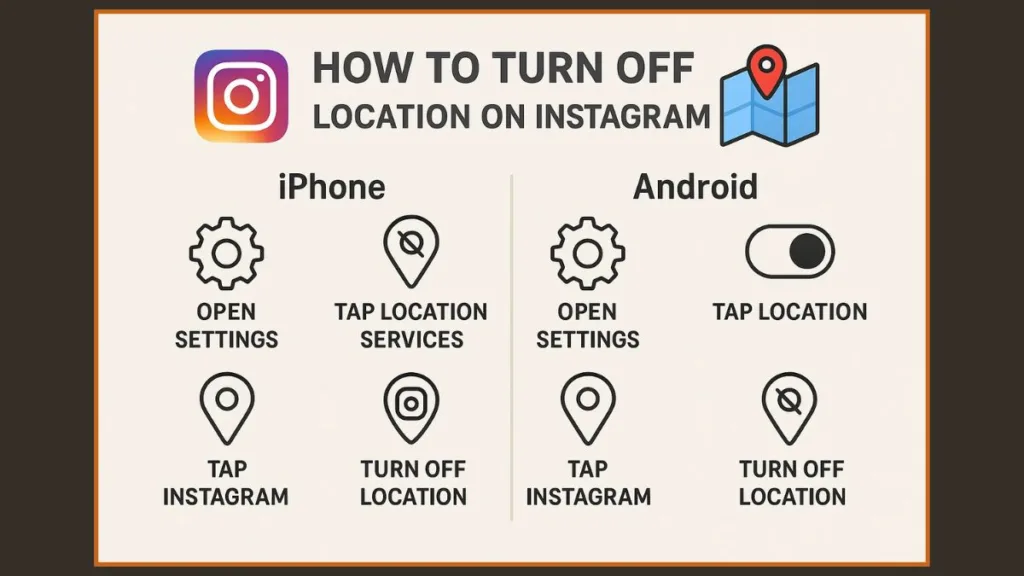
Deny location permission in your phone settings to stop Instagram from requesting GPS-based app location. Apple and Google both provide per-app permission controls, although exact labels vary by operating-system version and manufacturer.
| Device | Settings path | Strongest privacy choice | Less strict choice |
|---|---|---|---|
| iPhone or iPad | Settings, Privacy & Security, Location Services, Instagram | Never | While Using plus Precise Location off |
| Android | Settings, Apps, Instagram, Permissions, Location | Don't allow | Ask every time or Allow only while using, with precise location off |
| Instagram Map | DMs, Map, map settings | No one or stop sharing | Selected people or Close Friends |
| Content geotag | Edit post or Reel location | Remove location | Use a broad city rather than a venue |
Turning precise location off still permits an approximate area. Deny permission entirely when Instagram does not need location.
Be skeptical of Instagram account viewer sites or profile viewer claims that promise hidden location data; such services can be phishing or tracking traps.
How do you remove location tags from Instagram content?
Edit each eligible feed post or Reel and remove the displayed location; for an active Story, deleting and reposting without the location sticker is the cleanest option. A tagged place is content metadata and remains separate from Map's last-active-location sharing.
Open a post, tap its options, choose Edit, tap the location name, and remove it if the current interface permits. Check captions, alt text, visible street signs, event wristbands, school logos, house numbers, and comments too. Meta says location-tagged posts, Reels, and Stories from people someone follows can populate the Map for 24 hours, and mutually followed Notes can also appear there for 24 hours.
Future posts are easier: skip Add location during the Instagram posting process. When resharing, review location context using the Instagram reshare guide instead of automatically repeating a sensitive tag.
Does a private Instagram account hide your location?
A private account limits posts to approved followers, but it does not make location sharing harmless or invisible to those followers. Anyone you approve can still view, screenshot, describe, or forward what you reveal.
Review followers and remove people you no longer trust. Instagram does not let you fully hide every connection from approved followers, as the following-list visibility guide explains. Also inspect Close Friends and the exact Map audience; a private account with a broad follower list can expose a location to more people than intended.
Anonymous-viewer marketing is not a security audit. The anonymous Story viewer safety guide explains why no third party should be trusted with your login or promises of private-account access.
Can Instagram still estimate location after permission is off?
Yes, denying GPS permission stops one important source but does not eliminate every location clue Instagram or other people can infer. IP addresses can suggest a broad region, and your language, time zone, content, network, tagged venues, and interactions may reveal more.
A VPN may change an apparent network region, but it does not remove a location sticker, hide a landmark, or change content already posted. Photo files can also contain metadata before upload, though the more immediate exposure on Instagram is often what you deliberately show or tag. Avoid posting a home, workplace, school, hotel room, or real-time travel pattern until after leaving.
An optimized Instagram bio can use a broad service area instead of a precise address unless customers genuinely need a storefront location.
What should you do if location exposure creates a safety risk?
Stop sharing immediately, capture evidence, remove exposed content, and involve a trusted person or local emergency service when there is a credible threat. Privacy controls are useful, but they are not a substitute for a personal safety plan.
Block or restrict the threatening account, change passwords, enable two-factor authentication, review logged-in devices, and remove unknown connected apps. Tell household members not to tag you in real time. If a harasser knows your routine, vary it where safe and seek specialist domestic-violence or stalking support in your country. Never pay an unofficial support agent to remove a location; use Instagram's in-app reporting and Help Center routes only.
Frequently asked questions
Meta says Map location sharing is opt-in, so you choose whether and with whom to share. Still open Map and confirm its current indicator says you are not sharing.
Sources
Keep reading
More guides to grow your account.