How to Add Music to an Instagram Post or Story
Add licensed music to an Instagram photo post or Story, choose a clip and display, and fix missing tracks, muted audio, or business-account limits.
Short answer
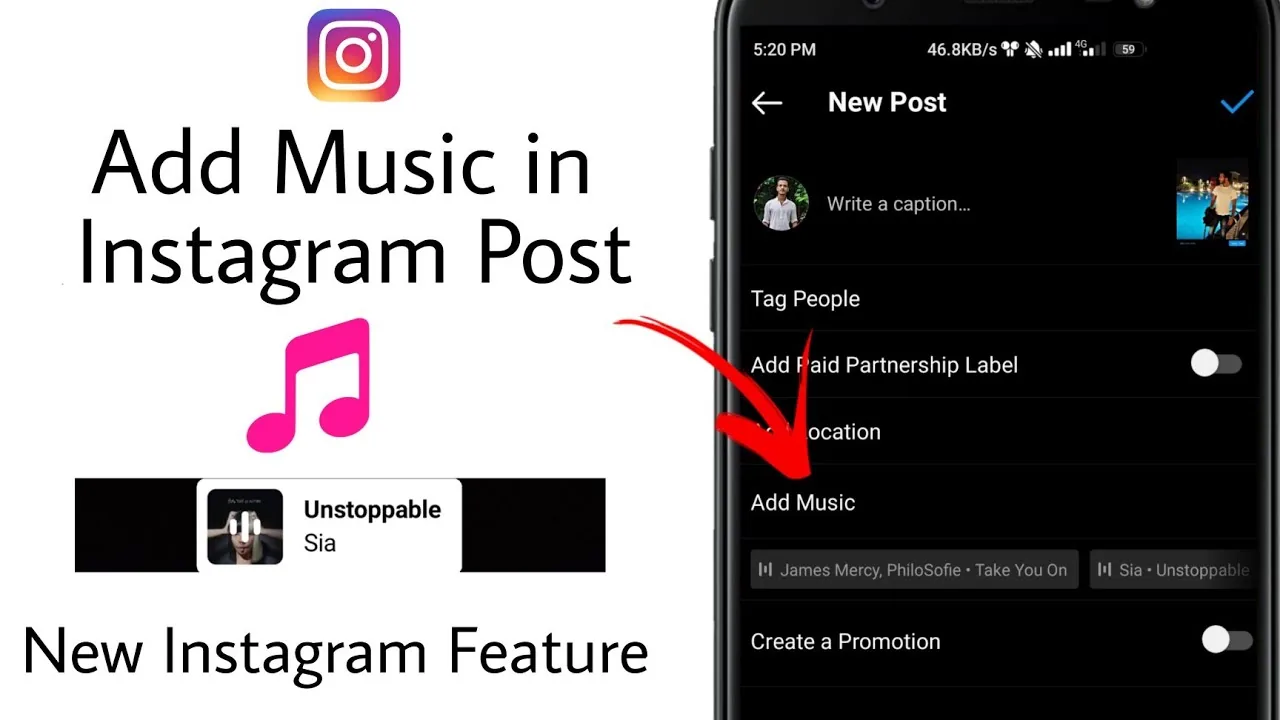
For a feed photo post, choose the media, continue to the caption screen, tap Add music, select a track and clip, then share. For a Story, open the Story editor, tap Stickers, choose Music, select the song segment and display style, and publish to the intended audience.
Key takeaways
- Feed posts and Stories use different music controls: Add music in the post composer and the Music sticker in Stories.
- Choose the exact permitted clip and preview it with the visual before publishing.
- Music availability varies by country, account type, rights holder, format, and current licensing.
- Business accounts may have a narrower licensed library and should use audio cleared for commercial use.
- A song can later be muted or removed if rights change, so keep a clean visual master outside Instagram.
Can you add music to an Instagram photo post?
Yes, eligible accounts can attach a licensed song clip to a feed photo or supported carousel from the composer. The control normally appears as Add music before sharing, while Stories use a Music sticker.
The feature links a selected excerpt from Instagram's licensed library to the visual post. It does not transfer ownership of the song or guarantee commercial rights outside the provided use. Availability differs by region and account, so the library shown in the composer is the practical source of permitted choices for that post.
For useful context, compare publish an Instagram post with understand Instagram video downloads.
How do you add music to a post or Story?
Create the visual first, then choose music inside the relevant Instagram editor, select the precise clip, and preview sound, text, and audience before publishing.
- For Feed, tap Create and Post, choose the photo or carousel, edit it, and continue to the caption screen.
- Tap Add music, search the licensed library, select a track, and choose the excerpt and duration offered.
- For a Story, choose the image or video, tap Stickers, select Music, and pick the track and segment.
- Choose the Story lyric, cover, or label style and position it away from important faces or text.
- Preview with sound on and off, confirm account, audience, tags, disclosures, and any original audio balance.
- Share, then check the live post from a viewer account when music is important to the message.
For Reels, use the Reel audio controls rather than the feed or Story workflow. If speech matters, lower music beneath the voice and check captions rather than assuming every viewer hears the track.
These steps also pair well with build a Reels hook and write a strong Instagram caption.
How does Instagram music differ by format?
Each format uses a different editor, clip behavior, and viewer experience. Select the format before designing the audio treatment.
| Format | Music control | Typical presentation | Main constraint |
|---|---|---|---|
| Feed photo | Add music in composer | Audio attached to visual post | Account and regional availability |
| Feed carousel | Add music when supported | One audio treatment across carousel | Mixed-media support can vary |
| Story | Music sticker | Clip with label, cover, or lyrics | Short Story timing |
| Reel | Reel audio tool | Original or licensed track on video | Commercial and remix rights |
| Business post | Commercially permitted library | Varies by format | Narrower licensing may apply |
Do not download a popular song elsewhere and embed it to bypass a missing library entry. That can trigger muting, blocking, or copyright claims and may exceed the license granted by Instagram's built-in tool.
To choose the right option, keep plan Instagram content and understand Instagram ranking nearby.
Why is Instagram music missing, unavailable, or muted?
The track may be unavailable in your region, restricted for the account or commercial use, removed by the rights holder, unsupported in that format, or hidden by an outdated app or temporary bug.
- The account is a business profile with a commercially restricted music catalog.
- The song is licensed in another country but not for the current viewer or publisher region.
- The rights holder removed or changed permission after the post was created.
- The chosen format, scheduler, branded-content setup, or mixed carousel does not support that audio.
- The app needs an update, restart, or a clean test project.
Search for alternate official versions and use Meta's permitted commercial music or original audio when appropriate. Do not switch account type solely to evade licensing; the intended use still matters.
If you hit a related problem, consult optimize Instagram content for search and repost an Instagram Story.
What copyright and accessibility rules apply to Instagram music?
Use tracks through the library and within the offered controls, but remember that licensing depends on territory, account, format, and purpose. Built-in availability is not a blanket license for ads, downloads, or reuse elsewhere.
For sponsored or business content, confirm commercial rights and disclosure requirements. Preserve spoken information in accurate captions and do not let music overpower voice. Flashing lyrics or rapid text can reduce accessibility. Keep a clean master so the post can be republished with replacement audio if a license changes.
For privacy and account safety, also review understand Instagram audio conversion risks and save video content safely.
How do you choose music that improves an Instagram post?
Choose audio that supports the emotion, pacing, and audience without carrying the entire meaning. The visual and caption should still communicate when muted.
- Match the track's tone and tempo to the visual purpose.
- Select a recognizable but contextually appropriate excerpt.
- Balance speech, effects, and music for phone speakers.
- Preview every format and retain a clean master.
Measure whether music improves watch time, shares, replies, or recall across comparable posts. A trending track can attract attention, but a clear original idea and legitimate rights create longer-term value.
Frequently asked questions
Choose the photo or supported carousel, continue to the caption screen, tap Add music, select a track and excerpt, then share.
Sources
Keep reading
More guides to grow your account.