How to Log Out of Instagram on Any Device (2026)
Log out of one Instagram account, remove saved login information and sign out unfamiliar sessions through Accounts Center without deleting the account.
Short answer
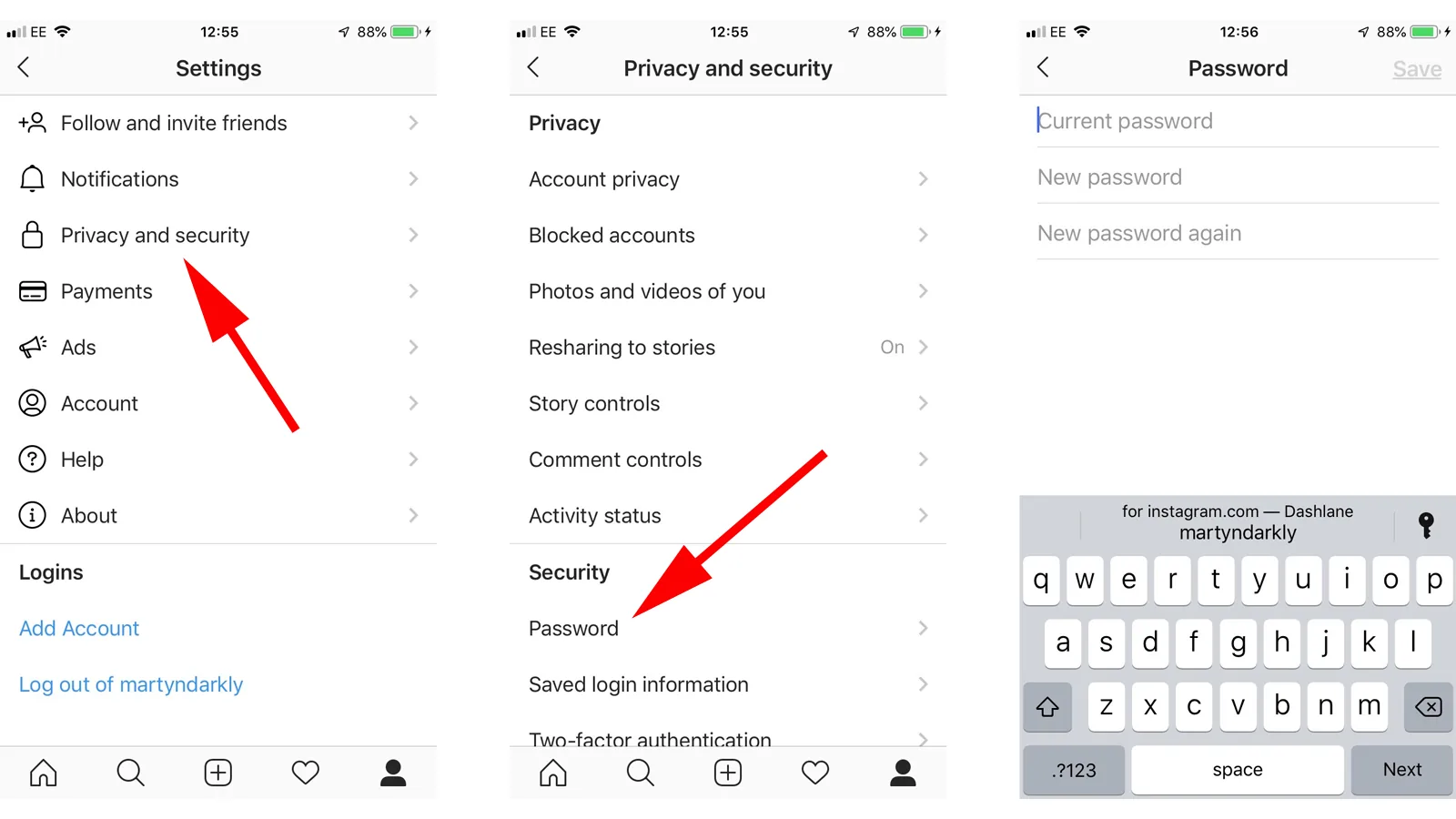
Open your profile menu, scroll to the login section and choose Log out for the active Instagram account. On a shared or lost device, also remove saved login information or use Accounts Center → Password and security → Where you’re logged in to end that remote session.
Key takeaways
- Logging out ends a session; it does not deactivate or delete the Instagram account.
- Removing a saved profile from a login screen removes device login information, not the online account.
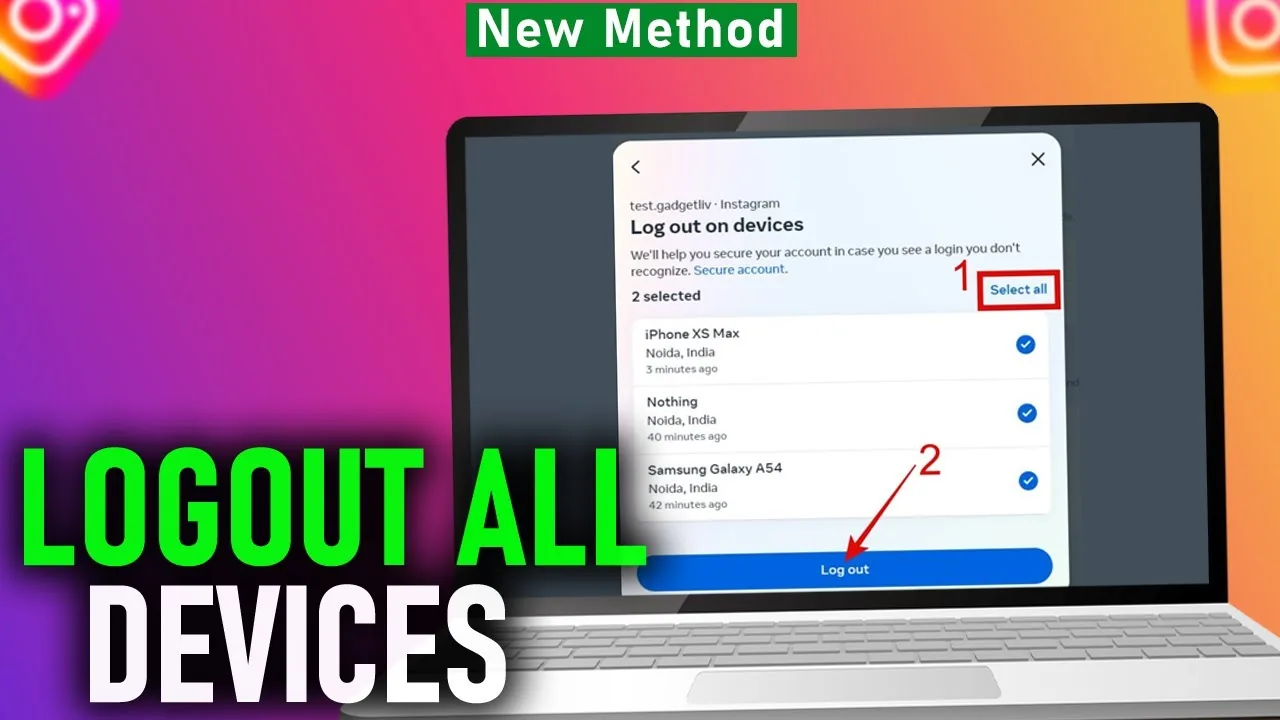
- Accounts Center can show recent sessions and let you select devices to log out.
- A shared device should not retain one-tap login information.
- An unfamiliar session requires a password change and security review, not only logout.
How do you log out of Instagram?
Log out by opening your profile, tapping the menu, scrolling to the login section and choosing Log out for the current account. If several accounts are present, read the confirmation so you do not end the wrong session or leave another profile open. On instagram.com, use the profile or More menu and choose Log out. Logging out changes device access only; posts, followers and the account remain online.
For the neighboring workflow, use How to Delete Your Instagram Account before changing another setting. The related guide to How to Delete an Instagram Account Permanently explains the control users most often confuse with this one.
How do you remove a saved account from the login screen?
Remove saved login information from the Instagram login screen by choosing its options, selecting Remove profiles from this device and removing the relevant profile where the feature is available. Instagram notes that not every account currently sees this control. A profile can appear because it was recently used, belongs to the same Accounts Center or is associated with an Android Google account. Removal does not deactivate or permanently delete it.
- Open the profile and Instagram menu.
- Scroll to the login section and choose Log out.
- Decline saving login information on a shared device.
- Remove the profile from the login screen if it still appears.
- Review Where you’re logged in and end unfamiliar remote sessions.
If your goal is broader account management, How to Disable Instagramin 2026 is the practical next step. You can compare the result with Instagram Customer Service Number 24/7: Does It Exist? so you do not solve the wrong problem.
How do you log Instagram out on another device?
Log out another device through Accounts Center under Password and security, then Where you’re logged in. Select the Instagram account, review the device and session list and choose the sessions to end. Locations can be approximate, so compare device type and time as well as city. If a session is unfamiliar, mark it appropriately, change the password and enable two-factor authentication rather than merely removing it.
| Action | What changes | Account deleted? |
|---|---|---|
| Log out | Ends a device session | No |
| Remove saved profile | Removes one-tap login from device | No |
| Remove from Accounts Center | Changes connected experiences | No |
| Delete account | Begins permanent removal | Yes, after process completes |
Choose the action that matches the access problem and read the confirmation before proceeding.
For a safer fallback, follow How to Clear Instagram Cache on iPhone and Android instead of handing credentials to an unknown service. Creators should also review How to Make Instagram Private in 2026: Steps and Limits because the same choice can affect reach or presentation.
What is the difference between logout and account removal?
Logout ends the current session, removing saved login info removes one-tap access from a device, deactivation hides the profile and deletion begins permanent removal. Removing an Instagram profile from Accounts Center changes connected experiences but does not automatically mean the same thing as deleting the Instagram account. Read every confirmation screen. These actions have very different consequences despite similar words such as remove, disconnect and log out.
- Never save login details on a public or shared device.
- Change the password when a session is genuinely unfamiliar.
- Secure the associated email and two-factor method.
- Do not assume remote logout deletes locally saved media.
The platform behavior makes more sense alongside How to Know If Someone Blocked You on Instagram. For the privacy side of the decision, read How to Turn Off Active Status on Instagram and keep the two settings separate.
Why does Instagram keep logging you back in?
Instagram may display a one-tap account because credentials or an encrypted login token remain saved on the device, the profile is connected in Accounts Center or the operating system restores app data. Remove saved profile information after logging out and disable browser password saving on shared hardware. If the app opens into an account you do not recognize, disconnect from the network if necessary and review login activity from a trusted device.
- Remove profiles from the login screen after logging out.
- Clear instagram.com site data on a shared browser.
- Review operating-system password and account restoration settings.
- Use a trusted device to end sessions on a lost phone.
A complete setup also benefits from How to Turn Off Read Receipts on Instagram in 2026, especially after an app update. When this action changes what other people see, Instagram Profile Viewer: Can You See Who Viewed Your Profile? provides useful context.
How should you log out on a shared or lost phone?
On a shared phone, log out, remove the saved profile and clear browser or app login data without deleting another person’s files. On a lost phone, use Where you’re logged in from a trusted device, end the session and change the password if the phone was unlocked or credentials were exposed. Revoke unknown connected apps and secure the associated email. Remote logout cannot physically erase screenshots or downloaded media stored on the lost device.
Frequently asked questions
Open your profile menu, scroll to Login and choose Log out. Confirm the correct account if several are added.
Sources
Keep reading
More guides to grow your account.