How to Download an Instagram Reel Video (2026)
Save public Instagram Reels to your camera roll using Instagram's built-in download button or a trusted third-party downloader.
Short answer
Instagram now lets you download most public Reels directly through the Share menu's Download option. If that button is missing, pasting the Reel's link into a reputable third-party downloader site works as a backup, with no login required.
Key takeaways
- Instagram's own Share menu now includes a Download option for many public Reels.
- Your own Reels can always be saved through the three-dot menu on your profile.
- Third-party downloader sites work by pasting a Reel link, with no Instagram login needed.
- Never enter your Instagram username or password on a downloader site or app.
- Downloaded Reels are for personal use — reposting someone else's content without credit can violate copyright.
- If you just want to revisit videos later without saving files, how to save instagram reels inside the app is a lighter-weight option.
Can you download someone else's Reel directly in the app?
Yes, for many public accounts. Open the Reel, tap the paper-airplane Share icon, and look for a Download option in the menu that appears — if it's there, tapping it saves the video straight to your camera roll. Not every creator has this enabled, since accounts can restrict sharing and downloads through their privacy settings, in which case the button simply won't show up — this is separate from whether the account is public or private, so check how to see private instagram accounts if the profile itself is locked.
How do you download your own Reels?
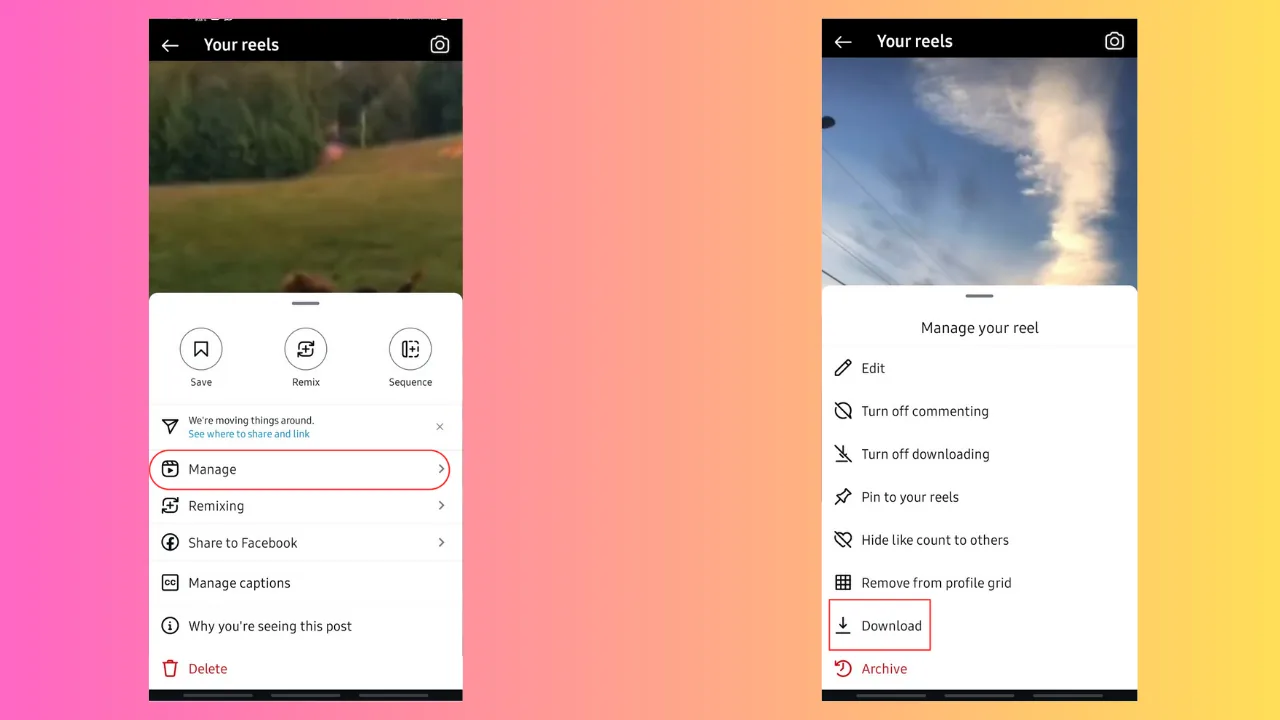
Go to your profile, open the Reels tab, select the Reel you posted, tap the three dots in the corner, and choose Save to your device or Download. This works regardless of whether the public download button is available to others, since you always retain full access to your own uploaded content, and it's the fastest route if you're archiving footage before you look into how to permanently delete instagram or clean up old posts.
What do you do when there's no download button?
Copy the Reel's link by tapping Share then Copy Link, then paste that link into a reputable browser-based downloader tool and tap its download button. These tools pull the public video file without requiring an Instagram login, so you never need to hand over any account credentials to a third-party site — treat any tool that asks for your password as a red flag and close it immediately.
Are third-party Reel downloaders safe to use?
Most browser-based ones that only ask for a public link, not a login, are reasonably safe, but quality and reliability vary widely between sites. Stick to tools that clearly state they don't store your data, avoid anything bundled with excessive ads or unexpected app installs, and never use a tool tied to your account credentials, since that crosses into the same risk territory as password-phishing scams promising to how to hack instagram accounts.
Is downloading someone's Reel and reposting it allowed?
Downloading for personal viewing is generally fine, but reposting without permission or credit can violate Instagram's terms and copyright law. If you want to legitimately share someone else's Reel, use Instagram's native repost or Add Yours features instead of learning how to repost on instagram with someone else's video attached to your own account, or message the creator directly to ask first.
Why does a downloaded Reel sometimes look lower quality?
Compression during download or re-encoding by a third-party tool can reduce resolution compared to the original upload. Using Instagram's native Download button when available preserves quality best, since the file comes straight from Instagram's servers rather than passing through an external conversion service, the same reason a direct how to post a video on instagram upload looks sharper than a re-uploaded, re-compressed copy.
Can you download a Reel someone shared with you in DMs?
Yes, if it was sent as a direct message rather than just linked, you can often press and hold the video in the chat to save it, similar to how you'd handle any how to see liked reels on instagram list you want to revisit later. If holding doesn't trigger a save option, fall back to copying the Reel's public link and using a downloader tool instead.
| Method | Login required | Best for |
|---|---|---|
| Native Share > Download | Yes (your own Instagram account) | Public Reels with download enabled |
| Your own Reels via profile | Yes | Archiving your own content |
| Third-party downloader website | No | Reels without a visible download option |
| Screen recording | Yes | Reels that block all download methods |
If none of these options work for a specific Reel, the creator likely disabled downloads and sharing entirely, and respecting that setting is the safest choice both legally and in terms of platform trust.
Frequently asked questions
The creator may have disabled sharing and downloads in their account settings, which removes the Download button from the Share menu entirely. In that case a third-party link-based downloader or screen recording are the remaining options.
Sources
Keep reading
More guides to grow your account.