How to See Your Instagram Watch History
Find recently viewed Reels via Your Activity > Watch History, though the list mainly covers Reels you engaged with, not everything you scrolled past.
Short answer
Go to your profile, tap the menu icon, then Your Activity, and select Watch History to see recently viewed Reels sorted newest to oldest. Instagram's history is limited to Reels you interacted with in some way, so for a complete record you need to download your full account data instead.
Key takeaways
- Watch History lives under Your Activity in the Instagram menu and lists recently viewed Reels
- The in-app history mainly reflects Reels you liked, commented on, or lingered on, not every video you silently scrolled past
- You can sort Watch History by newest to oldest or filter by content type
- For a complete list of every video watched, including ones with zero interaction, request your full data download instead
- Watch History is different from Liked Reels, which lives in its own separate section
- Clearing your history is possible, similar to how you might clear Instagram search suggestions to reset your recommendations
Where do I find my Instagram watch history?
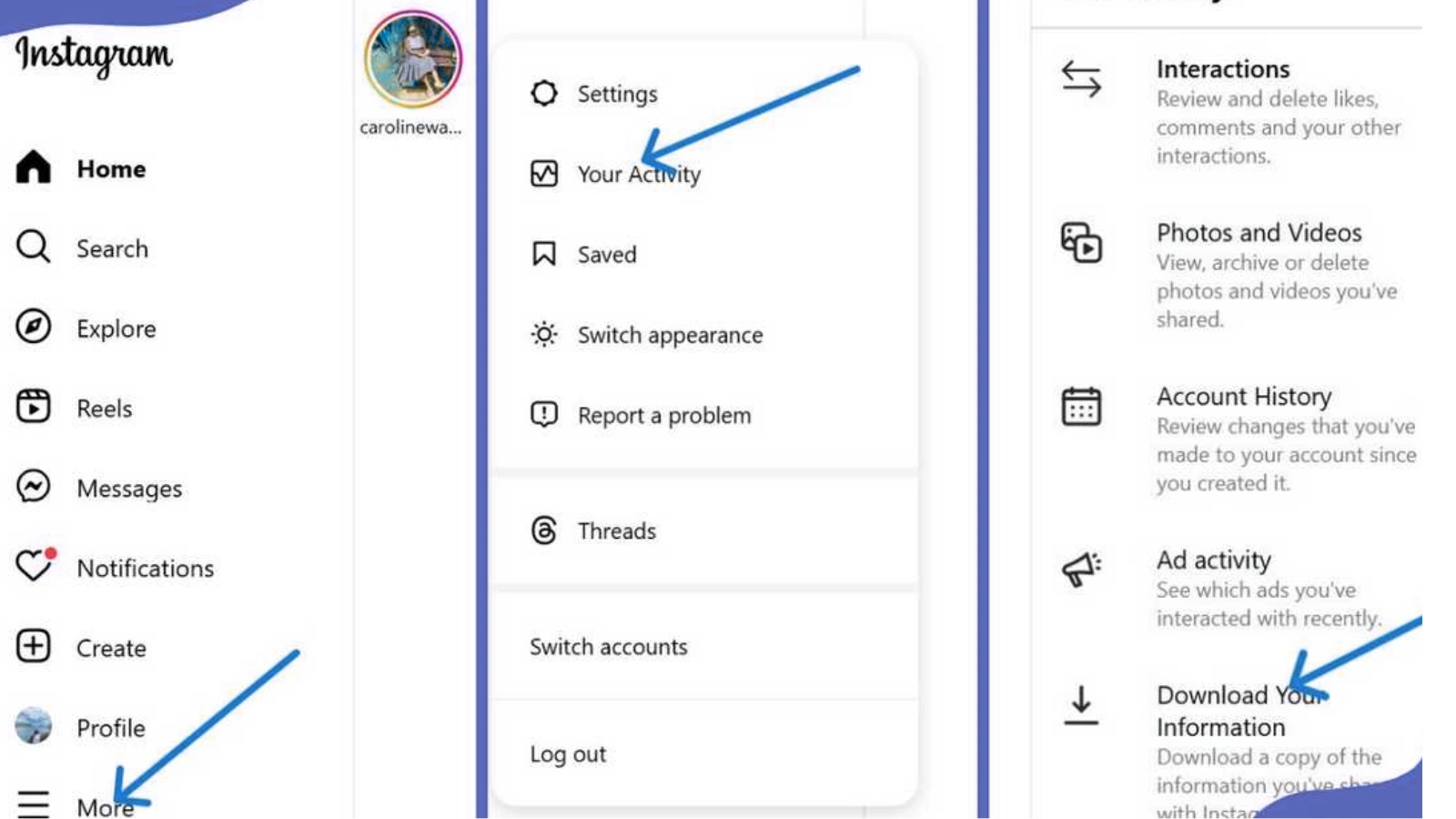
Tap your profile picture, then the three-line menu in the top right, then Your Activity, and select Watch History. This opens a scrollable list of Reels and videos you've recently viewed, generally sorted newest to oldest, with each entry linking back to the original post so you can rewatch it or find the creator again.
Does Watch History show every video I've ever scrolled past?
Not quite. Instagram's built-in history mostly reflects Reels you interacted with in some way, whether that's a like, comment, share, or spending noticeably longer on it than a quick scroll-by. Unlike YouTube's exhaustive watch history, Instagram doesn't openly catalog every single Reel that passed through your feed, so casual scrolling without any interaction often won't show up in this list at all.
How is Watch History different from my liked Reels?
Liked Reels lives in its own section: go to Your Activity, then Likes, then filter by Reels to see everything you've tapped the heart on, similar to how you'd see liked Reels directly. Watch History is broader in intent but narrower in practice, since it aims to log views generally but still leans heavily on engagement signals to decide what makes the cut.
Can I get a complete record of everything I've watched?
Yes, but only through Instagram's data download tool. Go to Settings, then Your Activity, then Download Your Information from a computer browser, request your account data, and once it arrives you'll find a videos_watched file listing every video with timestamps and account names, including ones you never liked or commented on. This is the only way to see truly complete viewing history, the same underlying process used when people download Instagram data for other reasons.
Can I clear or delete my watch history?
Yes, Instagram lets you clear your Watch History from the same Your Activity screen, which can help reset the kinds of Reels the algorithm serves you if your feed has drifted somewhere you don't want. Clearing history doesn't undo any likes or comments you've left, it only removes the passive viewing record itself.
| Feature | What it shows | Where to find it |
|---|---|---|
| Watch History | Recently viewed Reels with some interaction signal | Your Activity, Watch History |
| Liked Reels | Reels you've explicitly liked | Your Activity, Likes, filter Reels |
| Full data download | Every video watched, with timestamps | Settings, Download Your Information |
| Search History | Accounts and terms you've searched | Settings, Search History |
Why would I want to see my watch history at all?
It's useful for rediscovering a Reel you forgot to save, understanding why your Explore page looks a certain way, or simply auditing how much time you're spending on certain types of content. Creators sometimes check it to study what kind of videos they naturally gravitate toward, which can inform what they post themselves, the same instinct behind tracking what makes a Reel go viral.
Can I see watch history for someone else's account?
No, Watch History is private to the account it belongs to, and there's no setting that exposes another person's viewing activity to you, similarly to how you can't see who views your Instagram profile either. The only viewing data anyone can see about you comes from your own Story or Live viewer lists when you're the one who posted.
Conclusion
Instagram's Watch History under Your Activity is the fastest way to revisit recently viewed Reels, but it's built around engagement signals rather than a literal scroll-by-scroll log. If you need every single video you've ever watched, the account data download is the only tool that goes that deep.
Frequently asked questions
Tap your profile picture, open the menu icon, go to Your Activity, then select Watch History to see recently viewed Reels sorted newest to oldest.
Sources
Keep reading
More guides to grow your account.