How to Clear Instagram Search Suggestions: A Complete Guide
A complete guide on how to clear search suggestions, manage history, and reset your search queries on Instagram in 2026.
Short answer
Clear your Instagram search suggestions by deleting your search history in Accounts Center, hiding specific suggested accounts manually, and clearing your app cache to refresh recommendation databases.
Key takeaways
- Search suggestions are driven by your search history, profile visits, and popular trends.
- Clearing search history removes recent search queries but does not erase all suggestion data.
- You can hide specific suggested users manually by tapping the 'X' next to their handle.
- Clearing the app cache is required to refresh suggestion databases on mobile devices.
- Suggested accounts are also influenced by mutual followers and synced phone contacts.
How can you clear search suggestions on Instagram?
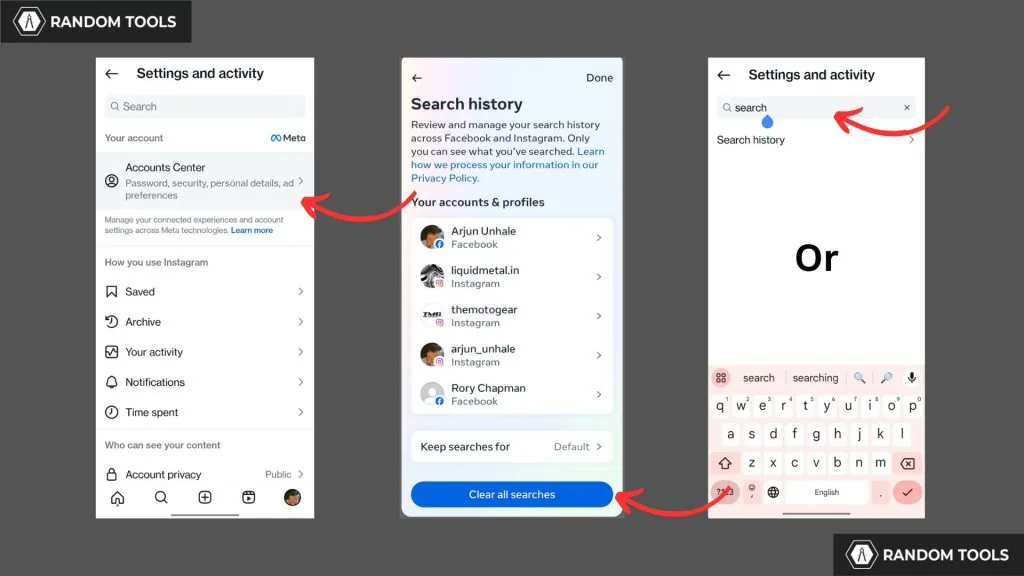
You can clear search suggestions on Instagram by opening your search bar, tapping the 'X' on individual recent queries, or deleting your search log in Accounts Center. This refreshes your recent search history.
To clear suggestions, open the app, tap the search icon, and tap see all. Select Clear all to wipe your recent search history. If you want to configure your profile privacy to block other suggestions completely, you can read our guide on how to secure your profile configuration natively. To see how search ranking algorithms analyze user history, you can check the Instagram algorithm explained guide.
Clearing these suggestions keeps your search dashboard clean. If you are executing a Instagram growth guide, understanding search patterns helps you optimize your profile. Writing targeted descriptions helps search positioning; read how to write Instagram bio for optimization suggestions.
How do you hide specific suggested accounts?
To hide specific suggested accounts, type their handle in the search bar, tap and hold their profile card when it appears, and select Hide to prevent them from showing up again.
Instagram allows you to manually hide suggested profiles that appear when you start typing. Tap the 'X' button next to their name in the suggested list, and they will be removed immediately. If you need to stop them from interacting with your profile completely, you can also learn how to delete Instagram account variables or block their access natively.
| Clean method | Data cleared | Impact on suggestions | Reversible? |
|---|---|---|---|
| Clear search history | Recent search logs | Removes recent queries from search bar | No, permanent |
| Hide specific users | Selected profile cards | Blocks user from suggestions | Yes, searchable |
| Clear app cache | Local temporary files | Refreshes interface databases | Yes, automatic |
| Disable contacts sync | Synced phone numbers | Stops suggesting phone contacts | Yes, toggle on |
For a complete feed cleanup, look at how to hide following list or learn to repost on Instagram natively to keep updates clean. If you want a complete break, you can disable account temporarily to pause active status.
How do you clear your app cache to refresh recommendations?
To clear your app cache, go to your phone settings, open the Apps menu, select Instagram, tap Storage, and click Clear Cache. This resets the local database files.
On iPhone, you must offload and reinstall the app to clear the cache completely. Clearing these files resets local suggestions that are stored on your device. For step-by-step cache instructions, refer to the clear app cache on your phone guide. When uploading your own content post-reset, follow how to post on Instagram to preserve video resolutions.
What metadata and privacy rules apply to search?
Instagram does not notify other users when you search for their profile or view their posts, and search history is kept completely private. Meta uses search history to personalize your feed ads.
While your search history is private, your active sessions record search behavior. When configuring privacy, check notification settings; read does Instagram show screenshots or look into whether does Instagram have profile views to understand visitor tracking capabilities.
Frequently asked questions
Instagram suggests accounts based on your search history, profiles you visit frequently, mutual followers, and active trends.
Sources
Keep reading
More guides to grow your account.