How to Use Instagram: Complete Beginner Guide (2026)
Learn how to use Instagram in 2026, from creating a profile and following people to posting, messaging, privacy, Reels and Stories.
Short answer
Instagram is a visual social app for sharing photos, videos, Stories and Reels, following accounts, and messaging people. Start by completing your profile, choosing privacy settings, following a few relevant accounts and publishing one clear post rather than trying every feature at once.
Key takeaways
- Instagram’s main surfaces are the Feed, Stories, Reels, Explore, Search, profiles and Direct messages.
- A private personal account limits posts to approved followers, but your name, username, photo, bio and links remain public.
- Stories normally disappear after 24 hours unless they are added to Highlights.
- Reels are short-form videos designed for discovery beyond an account’s existing followers.
- Two-factor authentication and a unique password are more important than any growth shortcut.
What is Instagram and what can you do with it?
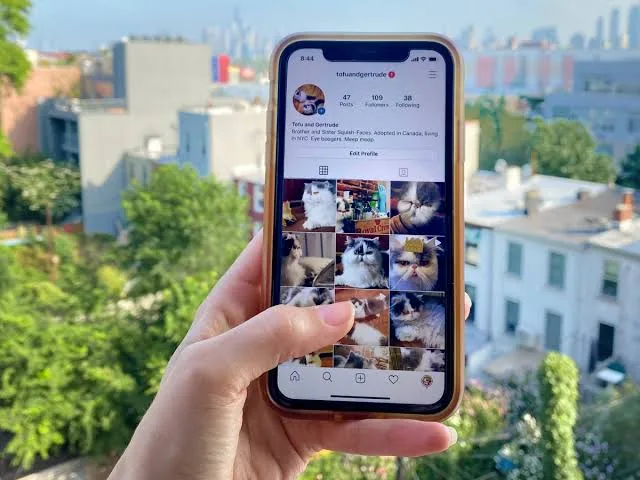
Instagram is a Meta-owned social network built around visual posts, short videos and conversations. You can follow people and organizations, publish photos or videos, create temporary Stories, watch Reels, search topics and accounts, and exchange Direct messages. The Home feed mixes content from accounts you follow with recommendations, while Explore and Reels emphasize discovery. A profile collects your posts, bio, links, follower counts and Highlights in one public-facing place.
For the neighboring workflow, use How to Post on Instagram: Step-by-Step Guide before changing another setting. The related guide to How Do You Upload on Instagram? Phone & Desktop explains the control users most often confuse with this one.
How do you set up Instagram for the first time?
Set up Instagram by creating an account with an email address or phone number, choosing a recognizable username and reviewing privacy before posting. Add a clear profile picture, short bio and only the links you are comfortable making public. Do not reuse a password from email or banking, and enable two-factor authentication. A focused first setup makes the app easier to understand and reduces the risk of impersonation or accidental oversharing.
- Download the official Instagram app or visit instagram.com and create an account.
- Choose a username, strong password, profile photo and short bio.
- Decide whether the personal account should be public or private.
- Follow a few people, publications or topics you genuinely want to see.
- Create one post or Story, then review comments, messages and notification controls.
If your goal is broader account management, How to Grow on Instagram in 2026: A Beginner Guide is the practical next step. You can compare the result with How Does the Instagram Algorithm Work in 2026? so you do not solve the wrong problem.
What are the main parts of the Instagram app?
The main parts of Instagram serve different jobs, so you do not need to use all of them. Feed is for ongoing updates, Stories are timely, Reels prioritize short video discovery, and Direct handles private conversations. Search and Explore help you find accounts or topics. Interface labels can move during tests, but the underlying actions remain similar across iPhone, Android and instagram.com.
| Surface | Best use | Typical visibility |
|---|---|---|
| Feed post | Durable photos, carousels or video | Public or approved followers |
| Story | Timely updates and interaction | Usually 24 hours |
| Reel | Short-form video discovery | Can reach non-followers |
| Direct | One-to-one or group conversation | Chat participants |
Use the surface that matches the lifespan and audience you want; posting everything everywhere usually creates unnecessary work.
For a safer fallback, follow How to Optimize Your Instagram Bio for More Followers instead of handing credentials to an unknown service. Creators should also review How to Write a Good Instagram Bio because the same choice can affect reach or presentation.
What should a beginner post first?
A beginner should post one useful photo, carousel or short video that clearly tells viewers what the account is about. Use a descriptive caption, accurate alt text when appropriate and a small number of genuinely relevant tags or keywords. Avoid dumping unrelated content merely to fill the grid. If the account represents a business or creator, choose a repeatable topic and a realistic publishing rhythm before worrying about advanced analytics.
- Never share a password, backup code or two-factor code in a message.
- Check the exact username before trusting a celebrity, brand or support account.
- Remember that screenshots and resharing can outlast content you delete.
- Disconnect third-party apps you no longer use.
The platform behavior makes more sense alongside Captions for Instagram: 60 Ideas That Drive Engagement. For the privacy side of the decision, read How to Batch an Instagram Content Calendar in One Day and keep the two settings separate.
How do you use Instagram safely?
Use Instagram safely by controlling who can contact you, treating unexpected links as suspicious and limiting the personal details you publish. A verification badge does not make every message or offer trustworthy, and support agents will not ask for your password or authentication code in a DM. Review tags, mentions, message requests and connected apps periodically. Block or report harassment, impersonation and scams instead of arguing with the account.
- Update Instagram and your phone’s operating system.
- Restart the app and test both Wi-Fi and mobile data.
- Check whether the problem affects one account or every account on the device.
- Use Report a problem for a reproducible bug instead of reinstalling repeatedly.
A complete setup also benefits from Best Time to Post on Instagram in 2026, especially after an app update. When this action changes what other people see, Instagram Search Queries Optimization: The 2026 SEO Guide provides useful context.
What is the best way to learn Instagram?
The best way to learn Instagram is to practice one workflow at a time: follow, post, reply, save, then review privacy. Spend a week observing which formats feel useful before adding Reels, Live or professional tools. Instagram changes frequently, so use the current in-app labels and official Help Center when a tutorial’s screenshots differ. A small, intentional routine is more sustainable than chasing every new feature or promise of instant growth.
Frequently asked questions
Yes, the standard Instagram app and account are free. Meta may show ads and offers optional paid services such as Meta Verified.
Sources
Keep reading
More guides to grow your account.