How to Tag Someone on Your Instagram Story (2026)
Mention up to 20 people in an Instagram story using the Aa text tool and the @ mention sticker, plus fixes when tags don't show up.
Short answer
Open the story camera, tap the Aa text tool or the mention sticker, type @ followed by the username, then select the account from the list before posting. You can mention up to 20 accounts per story, and tags can't be added after the story is live.
Key takeaways
- Tag people in a story with the Aa text tool (type @username) or the dedicated mention sticker — both work the same way
- You can mention up to 20 accounts in a single photo or video story
- Tags must be added before you post; there's no way to edit a story to add a mention after it's live
- Tagged accounts get a notification and their story appears in the tagged person's mentions tab, similar to how tagging works when you tag someone on Instagram in a regular post
- If a mention doesn't turn into a clickable tag, it's usually a typo, a blocked account, or an account that has mention permissions turned off
How do you actually add a tag to a story?
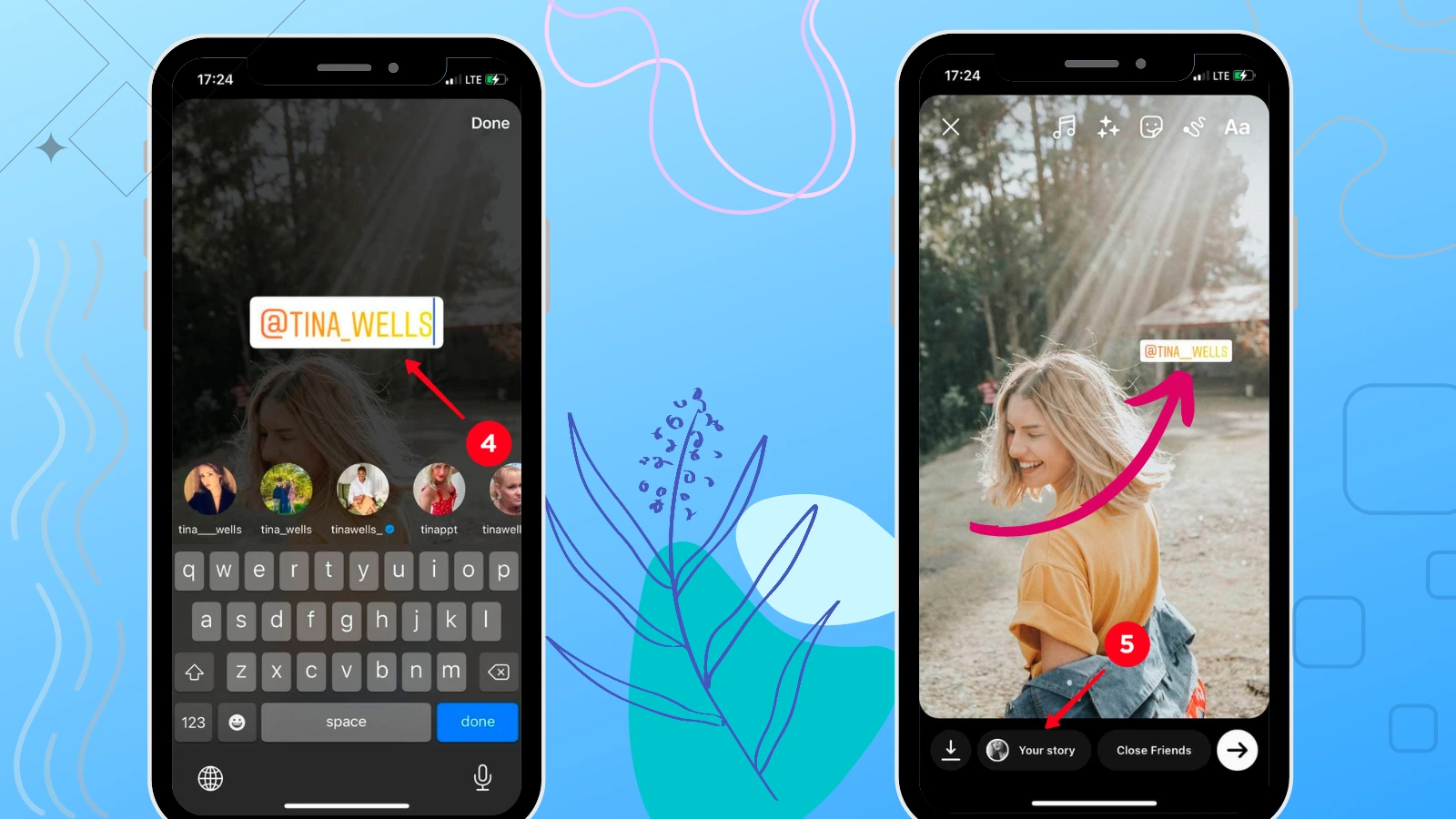
Open the story camera by swiping right from your feed or tapping the plus icon, then take or upload a photo or video. Tap the sticker icon or the Aa text icon at the top of the screen, then type @ followed by the username you want to tag — Instagram shows a dropdown of matching accounts as you type. Tap the correct name and the mention becomes an interactive sticker you can drag, resize, or recolor before you tap Your Story to post it. This is essentially the story-only version of how you tag on Instagram in feed posts and reels.
Why isn't the tag showing up when I type a username?
Usually because of a typo, a private account you don't follow, or because the person has restricted who can mention them in their privacy settings. Double-check the exact spelling by pulling up their profile in a separate tab, since Instagram's autocomplete only surfaces exact or near-exact matches. If you've recently gone through the process to unblock someone on Instagram, it can take a few minutes before mentions resolve normally again.
Can I tag someone whose account is private?
Yes, but only if you follow them or they follow you — otherwise the mention sticker won't resolve to a clickable tag. Even when it works, followers of a private account who don't already follow that person won't be able to tap through to view the profile. This differs from tagging on public posts, where anyone can see and click the tag regardless of follow status.
Does the person get notified when I tag them?
Yes, tagged users receive a push notification and the mention shows up in their activity feed, assuming their notification settings allow it. If they have Allow Tags From restricted to people they follow, tags from outside accounts still attach to the story but may not generate a notification.
What's the difference between the mention sticker and typing with Aa?
They produce the same visual result, but the mention sticker is a dedicated draggable element while the Aa version is inline text you can also style with fonts and colors. Some creators prefer the sticker because it's easier to reposition without disturbing surrounding captions, similar to how you'd layer elements when you add music to an Instagram post.
Can I remove or edit a tag after posting?
No — once a story is live you cannot add, remove, or edit a mention without deleting the entire story and reposting it. If you tagged the wrong account or misspelled a username, your only option is to delete the story from your archive and create a new one, similar to the workaround needed when you want to repost a story on Instagram with corrections.
| Method | Where it lives | Max mentions | Editable after posting |
|---|---|---|---|
| Aa text tool | Typed inline with other text | 20 | No |
| Mention sticker | Draggable sticker element | 20 | No |
| Feed post tag | Tap photo to place tag dot | 20 | Yes, anytime |
| Reel caption tag | @username in caption or comment | Unlimited in caption | Caption is editable |
Tagging in stories is one of the simplest ways to boost reach, since it puts your content in front of the tagged account's followers when they view it. Pair it with a strong Instagram bio and a consistent posting schedule to get the most out of every mention.
Frequently asked questions
Open the story camera, tap the Aa text icon or the mention sticker, type @ followed by their username, and select the account from the dropdown before sharing. The tag becomes a draggable sticker you can reposition on the screen.
Sources
Keep reading
More guides to grow your account.