Can You See Who Views Your Instagram Story?
Yes — Stories are the one part of Instagram that does show you exactly who watched, via a swipe-up viewer list, for as long as the Story is active (24 hours) and afterward through your Archive, though the list ordering follows Instagram's own ranking logic rather than a strict timestamp.
Short answer
Yes — Stories are the one part of Instagram that does show you exactly who watched, via a swipe-up viewer list, for as long as the Story is active (24 hours) and afterward through your Archive, though the list ordering follows Instagram's own ranking logic rather than a strict timestamp.
Quick answer
Yes. Of everything you can post on Instagram, Stories are the one format built with a visible viewer list from day one. While your Story is live (the standard 24-hour window), you can swipe up on it and see the exact accounts that watched, along with like counts and any reactions or replies. This is the opposite of feed posts and profile pages, which never expose who looked at them.
Key takeaways
- Story viewer lists are private — only you, the poster, can see them; the people on the list can't see each other
- The list order isn't strictly chronological; Instagram weights it by factors like how often you interact with that account, so close friends or frequent visitors often appear near the top regardless of exact view time
- Viewer data remains attached to a Story through your 24-hour posting window and generally stays accessible via your Archive afterward, though very old archived Stories may show a thinner list than they did originally
- Close Friends Stories (the green ring) use the same viewer-list mechanic — you still see exactly who watched, just from the smaller Close Friends audience
How the Story viewer list actually works
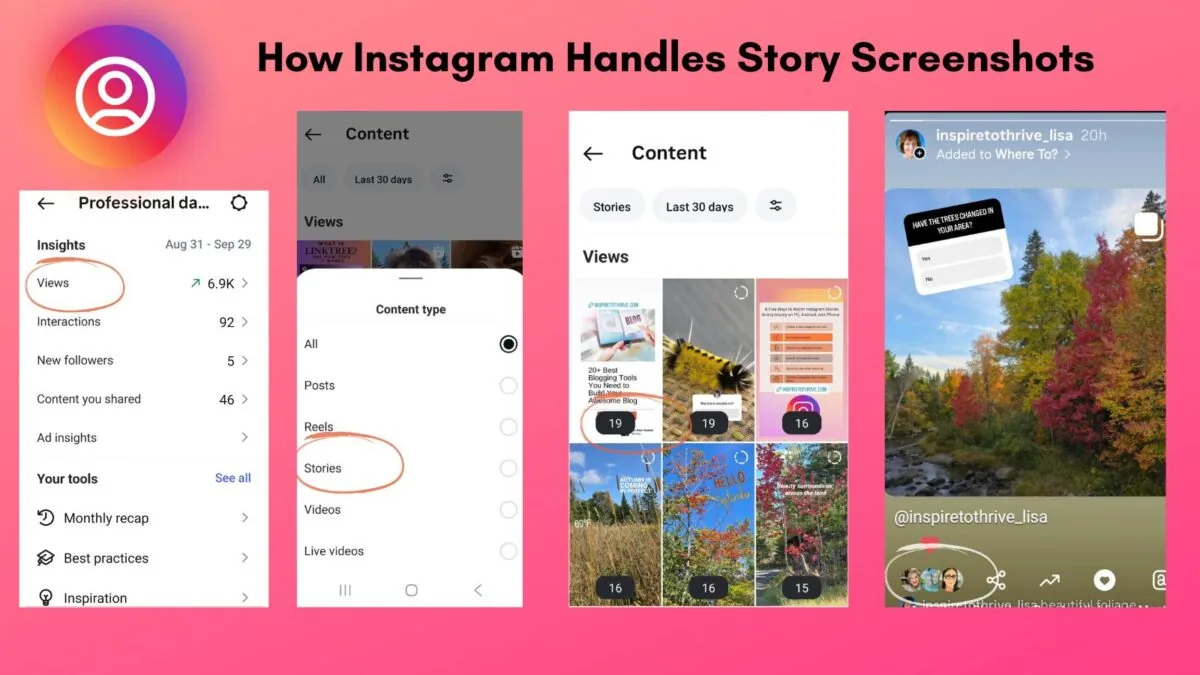
When someone opens your Story, Instagram logs that view immediately. As the poster, you access the list by tapping the small "eye" icon or the "X viewers" text near the bottom-left of your Story, or by swiping up while it's playing. What loads is a scrollable list of every unique account that has watched, plus a heart icon next to anyone who liked it and small labels for anyone who sent a message reply.
The order of that list is worth understanding because it trips people up. It is not simply "most recent view at the top." Instagram ranks the list using a mix of signals — including how frequently you interact with each account — similar to how its feed and DM ordering works elsewhere in the app. That's why someone who watched your Story an hour ago might appear below someone who watched it thirty seconds ago, if Instagram's model considers the first account a closer connection to you.
Checking who viewed a specific Story
- Open your own Story from your profile (tap your profile photo bubble) while it's within its active 24-hour window, or open it from your Archive afterward
- Tap the eye icon or "Seen by" / "X viewers" label at the bottom left of the screen
- Scroll the list that appears — hearts indicate a like, and a small message bubble indicates a DM reply, if any
- For multi-slide Stories, repeat per slide, since each slide has its own independent viewer list
Common mistakes to avoid
- Reading the order of the viewer list as a literal timeline — it reflects Instagram's relevance ranking, not necessarily who watched first
- Assuming a Close Friends Story hides the viewer list — it doesn't; you can see exactly who among your Close Friends watched, just as with a public Story
- Believing a low view count for followers with large audiences is unusual — Story view rates are typically a small fraction of total followers, since not everyone opens every Story
- Using screenshot-detection or "who screenshotted my story" apps — Instagram does not notify you of Story screenshots for regular photo/video Stories (it only ever notified for disappearing photo/video messages in direct messages, a different feature), so any app claiming to reveal this for Stories is misrepresenting what's possible
Tips for reading your Story audience
- Compare your Story viewer count to your follower count over time to gauge how much of your audience is actively engaging with Stories versus just following passively
- Use Insights (professional accounts) for aggregate Story metrics — reach, exits, replies, tap-forward/back rates — alongside the raw viewer list for a fuller picture
- Remember the viewer list disappears from easy access once a Story fully expires out of your Archive retention or if you delete it manually, so export or screenshot the list first if you need a permanent record
Frequently asked questions
No. The viewer list is private to the account that posted the Story. Viewers cannot see who else watched, and they aren't notified that they appear on a list.
Sources
Keep reading
More guides to grow your account.