Can You Download Someone's Close Friends Story on Instagram?
Instagram has no native download button for someone else's Close Friends story. Here's what actually works, and why it's a privacy gray area.
Short answer
No — Instagram does not give you a button to download someone else's Close Friends story, even if you're on their list. The only ways to keep a copy are screenshotting or screen recording while you view it, and neither triggers a notification, but doing so without the poster's consent is still a privacy and trust issue worth thinking through.
Key takeaways
- Instagram has no built-in save or download option for other people's Close Friends stories, only for your own.
- The green ring around a profile photo is the only signal that a story is Close Friends-only; it has nothing to do with download permissions.
- Screenshotting or screen recording a Close Friends story does not notify the poster, the same as with regular public stories.
- Third-party "story saver" sites that ask for your Instagram username and password are a major account-takeover risk and violate Instagram's Terms of Use.
- Being added to someone's Close Friends list is a sign of trust, not consent to save, repost, or redistribute what they share.
- If you want a reliable archive of your own content, use Instagram's native download tools instead of relying on other people's stories.
Can you actually download someone else's Close Friends story?
No. Instagram only exposes a save/download icon for stories you posted yourself; there is no equivalent control anywhere in the app for content someone else shares, Close Friends or otherwise. This is intentional — stories are designed to be ephemeral, and Meta has never added a general-purpose download feature for viewing other accounts' stories, even when you're on their Close Friends list.
What does the green ring on a Close Friends story actually mean?
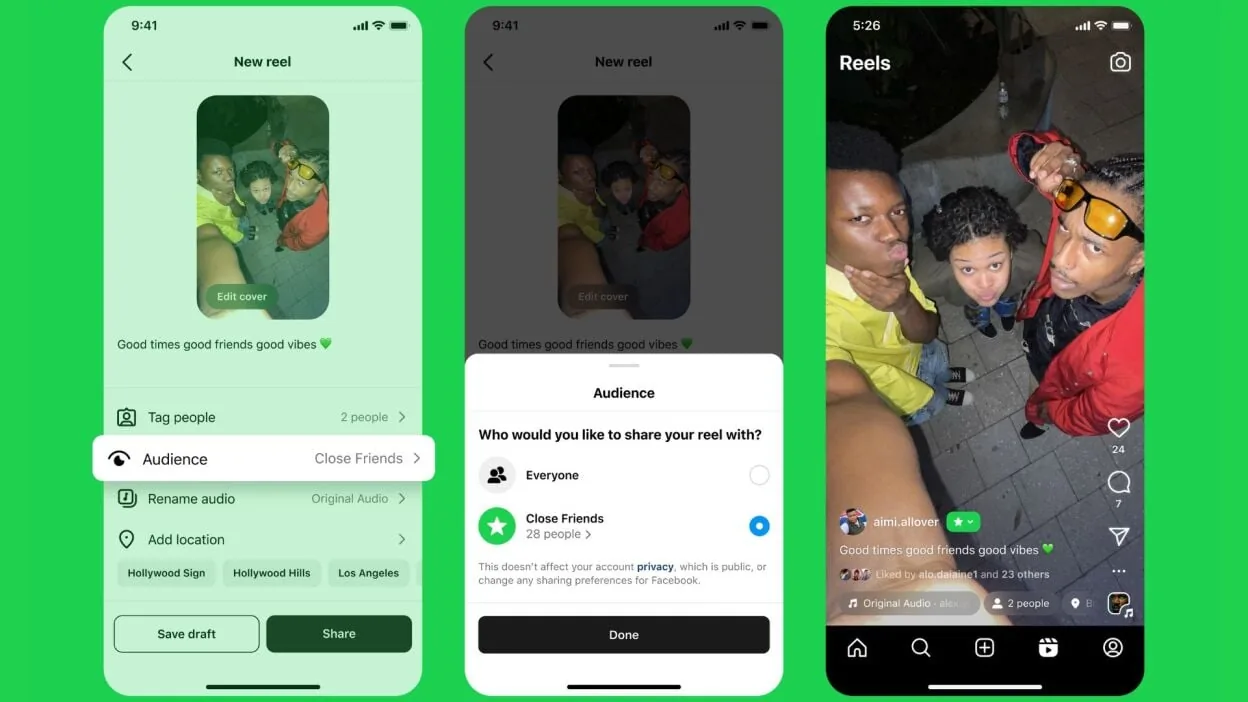
The green ring replacing the usual orange-to-pink gradient around a profile photo simply tells you that you're one of the people the poster chose to share that specific story with. It's a visibility marker, not a permissions setting, so it has zero bearing on whether you can download, save, or repost the content — those rules are the same as for any other story.
Is screen recording or screenshotting a Close Friends story different from a regular one?
No, the capture behavior is identical. Whether a story is public, follower-only, or Close Friends-only, Instagram does not send a notification when someone takes a screenshot or screen records it. That was true for regular photo stories even back when Instagram briefly notified on story screenshots years ago, and it remains true in 2026: screenshots and screen recordings of stories go undetected by the poster.
What about third-party Close Friends story downloader apps or websites?
Most of the "anonymous story saver" sites that promise to download other people's stories cannot actually reach Close Friends content at all, because that content isn't public and requires an authenticated session on the viewer's Close Friends list to even load. Some downloader tools, like desktop apps such as 4K Stogram, can pull stories you already have legitimate access to once you sign in with your own account — a very different situation from sites that only claim to work, similar to the confusion people run into when researching does Instagram alert screenshots, but any tool that asks you to enter your Instagram username and password on a third-party website is a serious risk — it can lead to account takeover, spam posting, or your login being sold. This is the same warning that applies broadly whenever you look into how to download Instagram videos safely: stick to methods that never require handing over your credentials to an outside site.
Does the poster get notified if you save their Close Friends story?
No. Instagram's notification system for stories only ever alerted users about screenshots of disappearing photos in direct messages, not story screenshots. If you're wondering more broadly whether the app flags any of this behavior, the honest answer covered in does Instagram notify when you screenshot a story is that regular story screenshots and screen recordings have never triggered an alert, and Close Friends stories follow that exact same rule.
Is it legal or ethical to save and share someone's Close Friends story?
Legally, screenshotting content you have permission to view is generally allowed for personal use, but redistributing someone's Close Friends story publicly without their consent can violate Instagram's Terms of Use and, depending on the content and jurisdiction, could raise copyright or privacy concerns. Ethically, being added to a Close Friends list is an act of trust — the poster chose a smaller, more intimate audience on purpose. Saving that content for yourself is different from reposting it, tagging the person, or forwarding it to people outside that circle, which can damage the relationship even if no rule is technically broken, even though no one can see if you screenshot their Instagram story in the first place.
How is this different from downloading your own Close Friends stories?
Your own stories are fully downloadable through Instagram's native tools. From your story viewer, tap the three-dot menu and choose Save, or turn on automatic saving to your device in Settings so every story you post lands in your camera roll. This is the same mechanism people use when they ask how can I save an Instagram video they posted themselves — the save button only ever applies to content that belongs to your own account, and it's worth knowing separately that people can't see what you save on Instagram either way.
| Scenario | Native download available? | Notification sent? | Recommended method |
|---|---|---|---|
| Your own Close Friends story | Yes, via Save option | No | Use in-app Save or auto-save setting |
| Someone else's Close Friends story | No | No (if screenshotted) | Screen recording, with the poster's consent |
| Someone else's public story | No | No | Screen recording, or ask them to share it |
| Any story via credential-based third-party site | Risky, not recommended | Unknown/unverifiable | Avoid entirely |
What should you do if you want to keep a Close Friends story someone shared with you?
The safest approach is to just ask. A quick message saying you'd like to save or repost their story respects the same boundary they set by curating their Close Friends list in the first place. If you do screen record for a personal keepsake, keep it private rather than reposting it elsewhere, similar to the etiquette people apply when they figure out how to save images from Instagram that belong to someone else. When in doubt, treat Close Friends content with the same restraint you'd want applied to your own.
Are there any Instagram settings that block screen recording of stories?
Not directly. Instagram does not offer a setting that prevents viewers from screen recording or screenshotting stories, Close Friends or otherwise, and there is currently no indication that Meta plans to add one. Some users mistakenly believe restricting an account or adjusting privacy settings changes this, but those controls affect who can view content, not what viewers can do with it once they see it — a distinction covered in more detail in guides on how to make Instagram private, which limits your audience but not their ability to capture what you post. If ongoing exposure to someone's Close Friends stories bothers you more than the download question itself, options like learning how to mute someone on Instagram address that more directly.
Frequently asked questions
No, Instagram does not provide a download or save button for anyone's story except your own. The only way to keep a copy of someone else's Close Friends story is to screenshot or screen record it while viewing.
Sources
Keep reading
More guides to grow your account.