How to Reset Your Instagram Password (2026 Guide)
Reset a forgotten Instagram password via email or SMS in minutes, or use the hacked-account recovery flow if you've lost access to both.
Short answer
To reset a forgotten Instagram password, tap Forgot Password on the login screen, verify your username, email, or phone number, and follow the emailed or texted reset link. If you've lost access to both your email and phone, Instagram's video-selfie identity verification flow can still recover the account.
Key takeaways
- On the login screen, tap Forgot Password on iOS or Get Help Logging In on Android to start a reset
- You can reset a password using your email, phone number, or a linked Facebook account
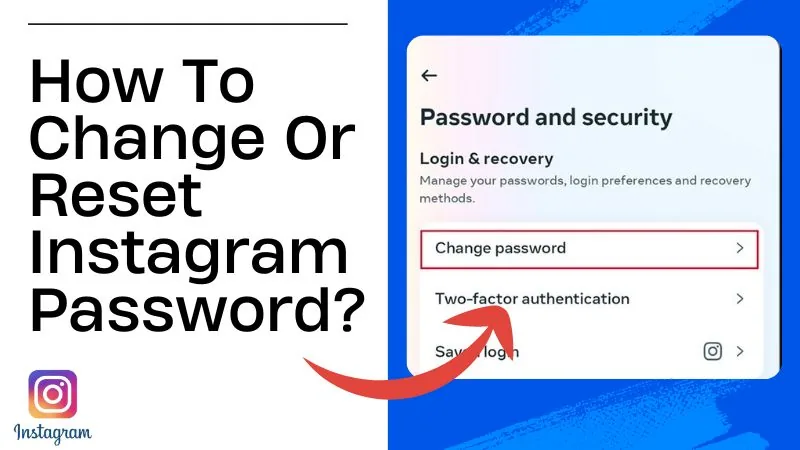
- If you're already logged in, change your password under Accounts Center > Password and Security
- Losing access to both your email and phone requires Instagram's identity verification flow, including a video selfie
- Reset links and codes typically expire within a short window, so use them promptly
- Never enter your Instagram password on a third-party site claiming to help with password recovery
How do you reset your Instagram password if you forgot it?
On the login screen, tap Forgot Password on iOS or Get Help Logging In on Android, enter your username, email, or phone number, and tap Next. Choose email or SMS delivery, then open the message and tap the link to set a new password. This is the fastest official method and works whether you're locked out on mobile or trying to log back in on desktop, similar in spirit to how people troubleshoot recovering a deleted DM on Instagram through official channels rather than shortcuts.
How do you change your password if you're still logged in?
Open the app, tap your profile icon, then the menu bar, select Accounts Center, then Password and Security, then Change Password. Enter your current password followed by the new one, then confirm. Worth doing periodically as a security habit, especially before you go through steps like downloading your Instagram chat history that involve sensitive account data.
What if you can't access your email or phone number anymore?
Tap Get Help Logging In, enter your username, select Can't Reset Your Password, and choose the option indicating your account was hacked. Instagram guides you through identity verification that can include a short video selfie, after which it sends a reset link to a new email you provide. This flow exists specifically for when the standard email or SMS reset isn't possible.
How long do password reset links and codes stay valid?
Reset links and SMS codes are time-limited, generally only good for a short window after they're sent, so request a new one if too much time passes. If a link expires, simply repeat the Forgot Password steps for a fresh one rather than reusing an old message.
What should you do after resetting your password?
Update your password manager, and enable two-factor authentication under Accounts Center if it isn't already on, since a reset is a good moment to tighten security generally. Also review your active login sessions to make sure no unfamiliar device still has access, a habit that pairs well with checking who's viewed your Instagram profile after any security scare.
Are third-party password recovery tools trustworthy?
No, avoid any site outside Instagram's own login screen and Accounts Center that claims to reset your password for you. These are almost always phishing attempts designed to capture your credentials, and Instagram never requires a third-party tool for a legitimate reset, the same rule that applies before trying any unofficial Instagram profile viewer tool.
| Situation | Recovery method | What you need |
|---|---|---|
| Forgot password, have email/phone access | Forgot Password link on login screen | Registered email or phone number |
| Logged in, want to change password | Accounts Center > Password and Security | Current password |
| Lost access to email and phone | Get Help Logging In > hacked account flow | Video selfie for identity verification |
| Suspect account compromise | Get Help Logging In > report hacked | New email address for the reset link |
Frequently asked questions
How to Reset Instagram Password?
Tap Forgot Password on iOS or Get Help Logging In on Android from the login screen, enter your username, email, or phone number, choose email or SMS delivery, then follow the link to set a new password.
Is it safe to reset your password this way?
Yes, using Instagram's own login screen and Accounts Center tools is completely safe. Never enter your credentials on any third-party site claiming to offer password recovery.
Does password reset work on both mobile and desktop?
Yes, you can reset your password from the app or from instagram.com on desktop, using the same underlying email or SMS verification process.
Do I need a business or creator account for this process?
No, the password reset flow is identical across personal, business, and creator accounts, the same as changing your Instagram username works the same way regardless of account type.
What if I don't receive the reset email or text?
Check your spam folder, confirm the email or phone number on file is accurate, and wait a few minutes before requesting another reset link.
Can I reset my password without access to my email or phone?
Yes, use Get Help Logging In, select Can't Reset Your Password, then choose the hacked-account option, which uses a video selfie to verify your identity before sending a reset link to a new email.
How long does a reset link stay active?
Reset links and SMS codes are only valid for a limited time, so use them promptly or request a fresh one, the same urgency that applies when trying to see who unfollowed you before that data changes again.
Will resetting my password log me out of other devices?
Not automatically in every case, but review your active sessions under Accounts Center afterward and log out any devices you don't recognize.
Can I reset my password if my account was hacked and the email was changed?
Yes, though it's harder. Use the hacked-account recovery flow, designed to verify your identity even when an attacker changed your registered email or phone number.
Should I enable two-factor authentication after resetting my password?
Yes, turning on two-factor authentication under Accounts Center significantly reduces the chance of another unauthorized password change.
Frequently asked questions
Tap Forgot Password on iOS or Get Help Logging In on Android from the login screen, enter your username, email, or phone number, choose email or SMS delivery, then follow the link to set a new password.
Sources
Keep reading
More guides to grow your account.