How to Reset Your Instagram Algorithm in 2026
Reset suggested content across Explore, Reels, and Feed, then retrain recommendations with deliberate follows, feedback, searches, and interactions.
Short answer
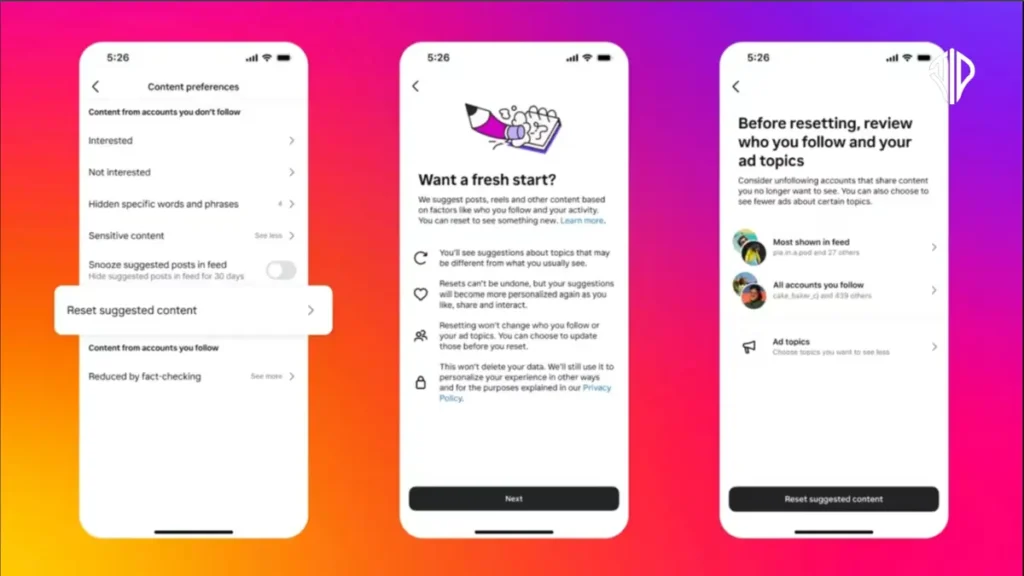
Use Instagram's Reset suggested content control under Content preferences to clear recommendation signals for Explore, Reels, and suggested Feed content. The reset does not erase your account or followed posts; recommendations personalize again from what you view, follow, like, save, share, and mark Interested or Not interested.
Key takeaways
- Reset suggested content clears recommendations across Explore, Reels, and Feed without deleting the account.
- The feature does not make a permanent blank slate; Instagram learns again from subsequent activity.
- Review followed accounts during the reset because follows remain a strong source of Feed content.
- Use Interested, Not interested, Hidden Words, Following, and Favorites to shape results after resetting.
- Clearing search history or app cache alone does not reset recommendation models.
Can you really reset the Instagram algorithm?
You can reset Instagram's suggested-content recommendations, but you cannot erase every ranking signal or turn off all algorithms. The official reset affects recommendations in Explore, Reels, and Feed, then personalization begins again.
Instagram is not one algorithm: Feed, Stories, Reels, Search, and Explore use different systems and context. Reset suggested content is designed for recommended material, not as an account reset. It does not unfollow everyone, delete likes, remove posts, or guarantee that a disliked topic never appears. It gives you a new recommendation starting point and a chance to audit follows.
For useful context, compare understand Instagram's ranking systems with understand Instagram search.
How do you reset suggested content on Instagram?
Open Content preferences, choose Reset suggested content, review the explanation, and confirm. Then deliberately shape the first days of new interactions.
- Open your profile, tap the three-line menu, and enter Settings and activity.
- Open Content preferences and look for Reset suggested content.
- Review what the reset affects, continue, and optionally inspect accounts you follow.
- Confirm the reset; do not expect Explore to become empty or chronological.
- Search for and engage with a small set of topics you genuinely want to see.
- Use Interested, Not interested, Favorites, Following, and Hidden Words consistently for at least several sessions.
If the setting is absent, update Instagram and check again later because rollout can vary. Avoid mass-liking dozens of unrelated posts immediately after the reset; the system will learn from that mixed behavior and become noisy again.
These steps also pair well with build a healthy growth plan and mute unwanted accounts.
What does each Instagram reset or control actually change?
Recommendation reset, search-history clearing, cache clearing, and feed controls solve different problems. Use the control that matches the symptom.
| Action | Changes | Does not change | Use when |
|---|---|---|---|
| Reset suggested content | Explore, Reels, suggested Feed recommendations | Posts, followers, messages | Recommendations feel broadly wrong |
| Clear search history | Visible recent searches | Ranking history as a whole | You want to remove search entries |
| Clear app cache | Local temporary files | Server-side recommendations | App is glitching or using excess storage |
| Not interested | Signals against similar recommendations | All content from the topic | A specific recommendation is unwanted |
| Following/Favorites feed | What feed view you choose | Default recommendation model | You want follower-focused browsing |
Deleting and recreating an account is an extreme action that loses history and does not guarantee better recommendations. Start with the dedicated reset and feedback tools, which are reversible and designed for the task.
To choose the right option, keep clear local Instagram cache and avoid risky tracking apps nearby.
Why does unwanted content return after an algorithm reset?
Unwanted topics return when new viewing behavior, follows, shared-device activity, broad trends, or ambiguous signals point back toward them. A reset is the beginning of retraining, not a permanent block.
- You watch disliked Reels to the end, reread comments, or share them while intending only to criticize.
- Followed accounts continue posting the topic even though recommendations were reset.
- Broad searches and popular audio connect multiple topics you did not intend to combine.
- Several people use the same account or device and send conflicting interest signals.
- You marked one post Not interested but did not use Hidden Words or unfollow persistent sources.
Scroll away quickly from irrelevant material and avoid hate-watching. Use Hidden Words for recurring terms, unfollow or mute accounts that no longer fit, and curate Favorites for the accounts you most want to prioritize.
If you hit a related problem, consult make your account private and control activity visibility.
What are the privacy and mental-health limits of resetting recommendations?
A reset changes what Instagram recommends; it does not delete Meta account data, block sensitive topics perfectly, or replace safety controls. Use stronger tools for harassment, self-harm content, or unwanted contact.
Report content that violates rules, block or restrict people who target you, and use Sensitive Content Control and teen-account protections where appropriate. If the feed is causing distress, take a break rather than trying to perfect every recommendation. Do not pay a third party to reset the algorithm or give an app your login; only Instagram can change its server-side recommendation state.
For privacy and account safety, also review create relevant Instagram captions and read your own Instagram Insights.
How do you retrain Instagram recommendations well?
Retrain recommendations by making a small number of consistent, meaningful choices over time. The system responds to patterns, not one dramatic session.
- Follow accounts that reliably cover the topics you want.
- Save and share genuinely useful posts rather than liking everything.
- Use Not interested and Hidden Words for repeated unwanted themes.
- Review the result after a week and adjust follows before resetting again.
Separate a research or business account when its browsing purpose conflicts with your personal interests. That reduces mixed signals and creates a cleaner audience and content workflow without pretending the algorithm can be frozen.
Frequently asked questions
Yes, use Reset suggested content under Content preferences for Explore, Reels, and suggested Feed recommendations.
Sources
Keep reading
More guides to grow your account.